

If you run anything important on Relay.app, stop reading comparison posts and go export your data. Then come back.
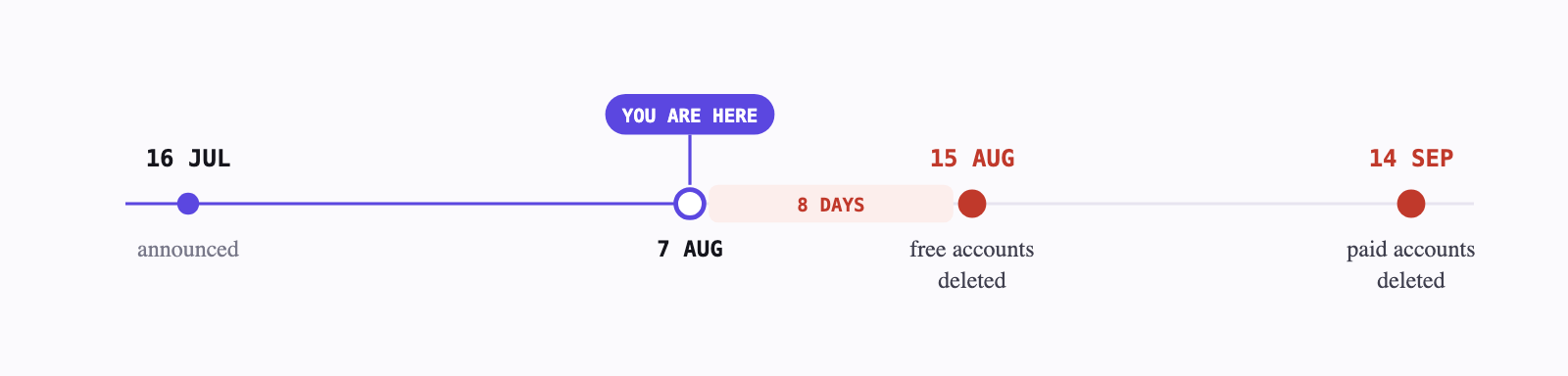
That's not a rhetorical device. Relay told customers on 16 July 2026 that it's winding down, and the deletion dates are close enough that the export is the only step that can't be undone later.
Hard deadlines · Relay.app
Free accounts + all data deleted 15 Aug 2026 Paid accounts + all data deleted 14 Sep 2026 New signups & upgrades Already off Both cutoffs are 23:59 PT. Stored app credentials and API tokens go with the account — those can't be exported, and every connected integration will need re-authorising wherever you land.
No reason for the shutdown has been given. Not on the homepage, not in the FAQ, and there's no announced acquisition. Anyone telling you why is guessing, this post included — so we won't.
What's left is a practical question: six or seven weeks to move an automation stack, and a market full of tools that all claim to be the obvious destination. Here's the honest version, including where our own product is the wrong answer.
The timeline you're working against
Relay isn't going dark overnight. Existing workflows keep running through the wind-down, and paying customers keep full access free for the 60-day window, with extra step and AI-credit capacity thrown in. Annual subscribers get automatic prorated refunds.
That generosity is also the trap. Nothing breaks, so nothing feels urgent, and then it's 14 September and the credentials for forty integrations evaporate at once.
What "Zapier alternative" actually means
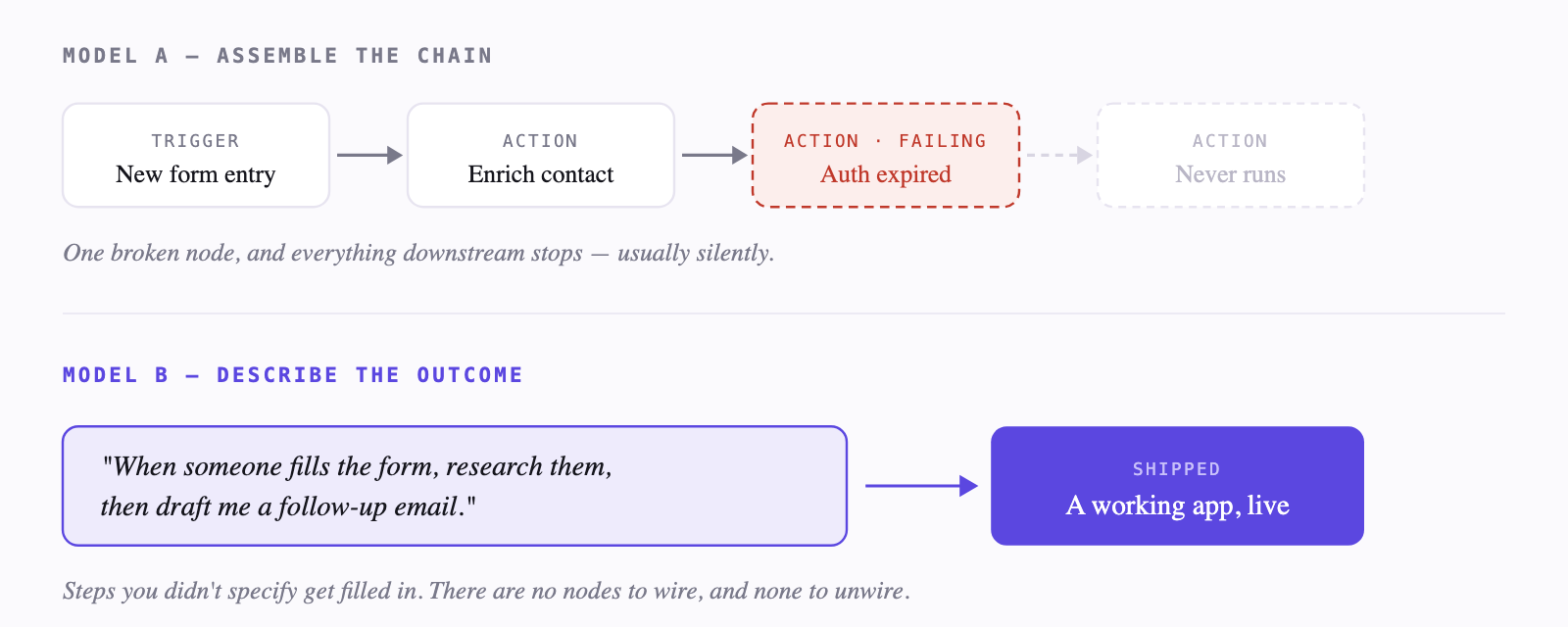
Almost every tool in this category is built on the same idea: a trigger fires, then actions run in sequence. New row in a sheet, so send an email, so update the CRM, so post to Slack. You assemble that chain from a library of pre-built blocks, and you maintain it forever.
That model has been remarkably durable, and it has two well-documented failure modes. The first is cost — Zapier meters by task, so the bill grows with usage, which is the most common complaint in its own reviews. The second is fragility. When one step in a fifteen-step chain silently stops working, finding out which one is a diagnostic job, and the person who built it is usually the only one who can do it.
There's a second, newer model that doesn't start from blocks at all: you describe the outcome in plain English, and the tool assembles the thing. That's the split worth understanding before you pick, because it determines who on your team can maintain what you build.
The five destinations
Zapier
The default, for better and worse
The biggest integration library and the one every SaaS tool builds a native connector for. If your workflow is a straight line between two popular apps, Zapier will have it working in ten minutes and it will keep working.
The friction shows up later. Pricing is per task, so a workflow that becomes popular becomes expensive, and that's the single loudest theme in its own review pages — users describing the product getting more unwieldy while the monthly rate climbs. Multi-step logic and branching are possible but get awkward, and debugging a silent failure is on you.
- Pick if — you want the safest, most-supported option and your workflows are simple and low-volume.
- Skip if — your task count is high, or you've already left Zapier once over the bill.
n8n
Own the infrastructure, own the pager
Source-available and self-hostable, which is a genuinely different proposition: your data stays on your servers and there's no per-task meter. Rated highest of the group by its users, and deservedly — it's powerful, and the node canvas will do things Zapier won't.
The cost is operational. Self-hosting means you maintain it, and the failure story people report is specific: dozens of undocumented flows, breaking constantly, some failing silently. There's also a handoff problem — a consultant builds something clean, then the client can't manage the API keys or accounts underneath it.
- Pick if — you have engineering capacity, want data on your own infrastructure, and someone will own it long-term.
- Skip if — the person maintaining this after you build it isn't technical.
Integrately
Fastest setup for common automations
The pitch is one-click, pre-built automations rather than a blank canvas — a library of ready-made recipes between popular apps. In a head-to-head comparison thread, users found it took roughly five minutes to set up an automation that took Pabbly thirty, though Pabbly came out cheaper annually.
That's the whole trade in miniature: speed versus price, with the same manual setup model underneath either way.
- Pick if — your automations are common patterns between mainstream apps and you want them running today.
- Skip if — your logic is unusual enough that no pre-built recipe fits.
Pipedream
For people who'd rather just write the code
Developer-first, with real code steps in any workflow alongside no-code integrations. If you've ever hit the edge of what a visual builder allows and wanted to drop into JavaScript or Python for one step, this is the tool that lets you.
It's still a trigger-and-action product, so comparing it to Zapier means comparing libraries, actions and pricing across both — you're choosing a flavour, not a different model.
- Pick if — you write code, and your workflows keep needing a step no library has.
- Skip if — nobody on the team wants to maintain code.
Relay.app
What you're leaving
Worth naming what was good about it, because it tells you what to look for. Relay was a visual no-code automation platform in the same family as Zapier and Make, built by Jacob Bank — previously product lead for Gmail and Calendar at Google, after selling Timeful to them in 2015. Its distinguishing feature was human-in-the-loop approval steps: automations that paused for a person to review before acting.
If that approval step is why you chose Relay, prioritise it in whatever you evaluate. It's the feature most likely to be missing, and the one hardest to reconstruct after the fact.
Where Something fits — and doesn't
Full disclosure: this is our product, on our blog. Here's the argument, and then the part where it isn't for you.
Every tool above is a trigger-action builder. You pick blocks and wire them together, and when one breaks, you go find out which. Something starts somewhere else:
Describe what you want. Something picks the model, connects your tools, builds the interface, and ships a real app — in minutes.
Not a chatbot, and not a flow you then have to babysit. Models, tools, interface, voice and hosting are handled as one product rather than five separate setups. There are 1,000+ integrations — Gmail, Slack, GitHub, Notion, Linear, Stripe, HubSpot, Salesforce, Jira. Zapier itself is one of the tools you can connect, which tells you the relationship is less either/or than the framing of this post suggests.
Pricing is credit-based rather than per-task: a free tier with no card, then paid plans with a monthly credit allowance split between building and running. The practical difference from Zapier's model is that a workflow becoming popular doesn't automatically become a bigger invoice — but credits don't roll over, so it's a different kind of budgeting, not the absence of one.
One early user described it as making automation feel accessible without building everything from scratch — useful for lead research, follow-ups and reporting.
— Gourav Nanduri · LinkedIn
Where Something is the wrong choice
You want to see and control every step. Some people think in flowcharts, and a canvas where each node is visible and editable is genuinely the better interface for them. We don't offer that, on purpose.
You need a compliance-grade audit trail today, or data that never leaves your own servers. That's an n8n self-host requirement, and we won't pretend otherwise.
You want years of independent reviews before committing. Zapier has thousands. We're not on G2 yet. If that's your bar, it's a fair one.
Side by side
| Something | Zapier | n8n | |
|---|---|---|---|
| Who it's for | Anyone. Describe it in plain English; no technical fluency assumed. | Non-technical to semi-technical, once you've learned Zap structure. | Technical users — its own marketing says so. |
| Setup | Describe the outcome; it gets built and shipped. | Pick a trigger, wire each action step by step. | Wire nodes on a canvas; understand the flow logic. |
| Pricing model | Credit-based, monthly refresh, no rollover. Free tier, no card. | Per task — cost rises with usage, not with what you build. | Paid cloud tiers, or self-host free under a fair-code licence. |
| When it breaks | You describe the problem in the same chat you built it in. | You debug the Zap. Silent failures are commonly reported. | You debug the flow, and you also own the infrastructure it runs on. |
| Handing to a non-technical colleague | No technical handoff needed. | Possible, but they'll need to learn the builder. | A known pain point — accounts and API keys become the blocker. |
| Independent reviews | Not yet listed on G2. | 4.5★ from ~2,100 G2 reviews. | 4.7★ from ~300 G2 reviews. |
Ratings and pricing as published at time of writing, August 2026. Verify current figures before making a purchasing decision — every vendor here changes pricing more often than they change positioning.
How to decide in two minutes
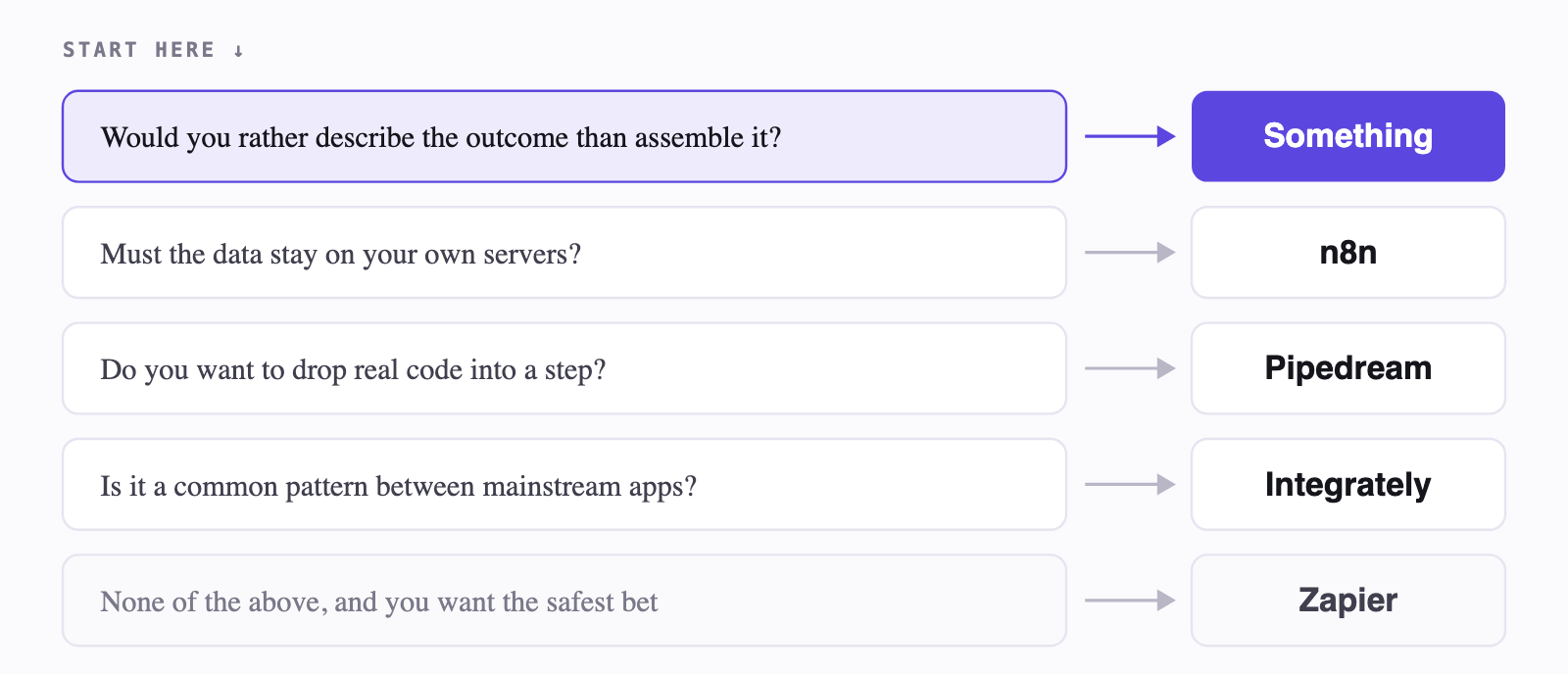
Most comparison posts end in a shrug. This one doesn't — the decision really does come down to two questions: who is building it, and who has to keep it alive.
Before you migrate: five things
1. Export today, evaluate later. Relay's export covers workflow definitions, run history and the generated prompts for each workflow. The export link is time-limited and there's no recovery after deletion. This takes ten minutes and removes the deadline from every other decision on this list.
2. Write down your credentials before they vanish. Stored tokens and app credentials are deleted with the account and aren't in the export. Every integration needs re-authorising wherever you land — list them now so you're not discovering them one broken workflow at a time.
3. Rank workflows by what happens if they fail silently. Not by how complex they were to build. The one that emails clients matters more than the clever one you're proud of.
4. Rebuild in parallel, don't cut over. Run the new version alongside Relay while both work, and compare actual outputs for a few days. You have a window where the old system still runs. Use it.
5. Don't assume feature parity. Especially on human-in-the-loop approvals, which was Relay's distinguishing feature and isn't standard elsewhere. A JSON export won't reconstruct itself into another platform's scenario — connections, field mappings, routing and error handling all get rebuilt and retested by hand.
The honest closing
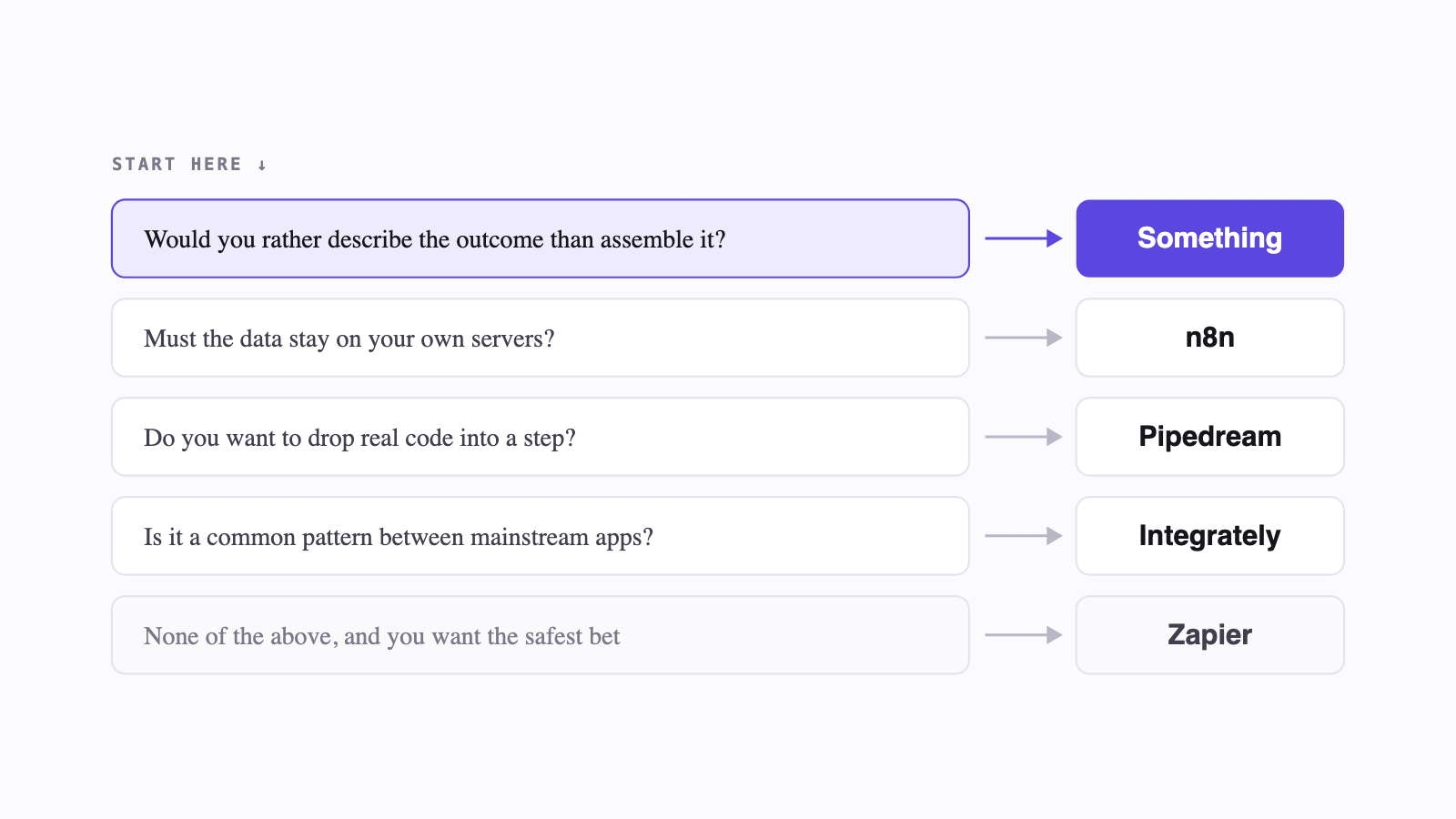
Pick based on two things: who's building it, and whether you want a visual canvas or something that asks you questions.
If you have engineers and infrastructure opinions, n8n. If you want the safest, most-documented path and volume is modest, Zapier. If you write code, Pipedream. If your automations are common shapes, Integrately.
And if the honest answer is that you never wanted to learn a node canvas — that you had a clear idea of what should happen and resented having to translate it into blocks — that's the gap we built Something for. There's a free tier and no card required, which is a reasonable way to find out in an afternoon whether the model suits how you think.
Whatever you choose: export first. Everything else is reversible.
FAQ
When exactly is Relay.app shutting down?
Free accounts and their data are deleted on 15 August 2026 at 23:59 PT; paying accounts follow on 14 September 2026 at 23:59 PT. New signups and free-to-paid upgrades were switched off when the announcement went out on 16 July 2026. Existing workflows keep running until your account's deadline.
Why is Relay.app shutting down?
No reason has been given. The notice covers deadlines, refunds and exports but doesn't explain the decision, and no acquisition has been announced. Treat any stated cause you read elsewhere as speculation.
Zapier is too expensive — what are the alternatives?
Zapier meters by task, so cost climbs the moment a workflow gets used rather than when you build more of them. n8n self-hosted removes the meter if you'll run the infrastructure; Integrately and Pabbly compete on price; Something uses a monthly credit allowance instead of per-task billing, so a popular workflow doesn't automatically mean a bigger invoice. (Question sourced from r/zapier)
Why use n8n over Make?
n8n's pitch is self-hosting and source-available control — you own the infrastructure. That's real, and it means you're also the one maintaining it. It's the right trade if you have engineering capacity and a data-residency requirement, and the wrong one if nobody wants to be on call for the automation stack. (Question sourced from r/n8n)
Zapier vs Pipedream?
Pipedream is more developer-geared but still offers no-code integrations, so the comparison comes down to triggers, actions and pricing across both. They share the same underlying model, which is worth knowing before you spend an afternoon on the spreadsheet. (Question sourced from r/zapier)
Zapier vs Integrately vs Pabbly?
One comparison thread found Integrately set up the same automation in about five minutes that took Pabbly thirty — while Pabbly worked out cheaper annually. That's the standard trade in this category: setup speed versus price, with the same manual assembly either way. (Question sourced from r/zapier)
Can I export my data out of Relay.app?
Yes, and do it now. The export includes workflow definitions, run data and the generated prompts for each workflow. Stored app credentials and tokens are deleted with the account and can't be recovered, so list your connected apps separately before the deadline.
Moving off Relay this month?
Describe the workflow you're rebuilding in one sentence and see what comes out. Free tier, no card, two agents to start. Try Something free →